apnabusinessbadhao.com

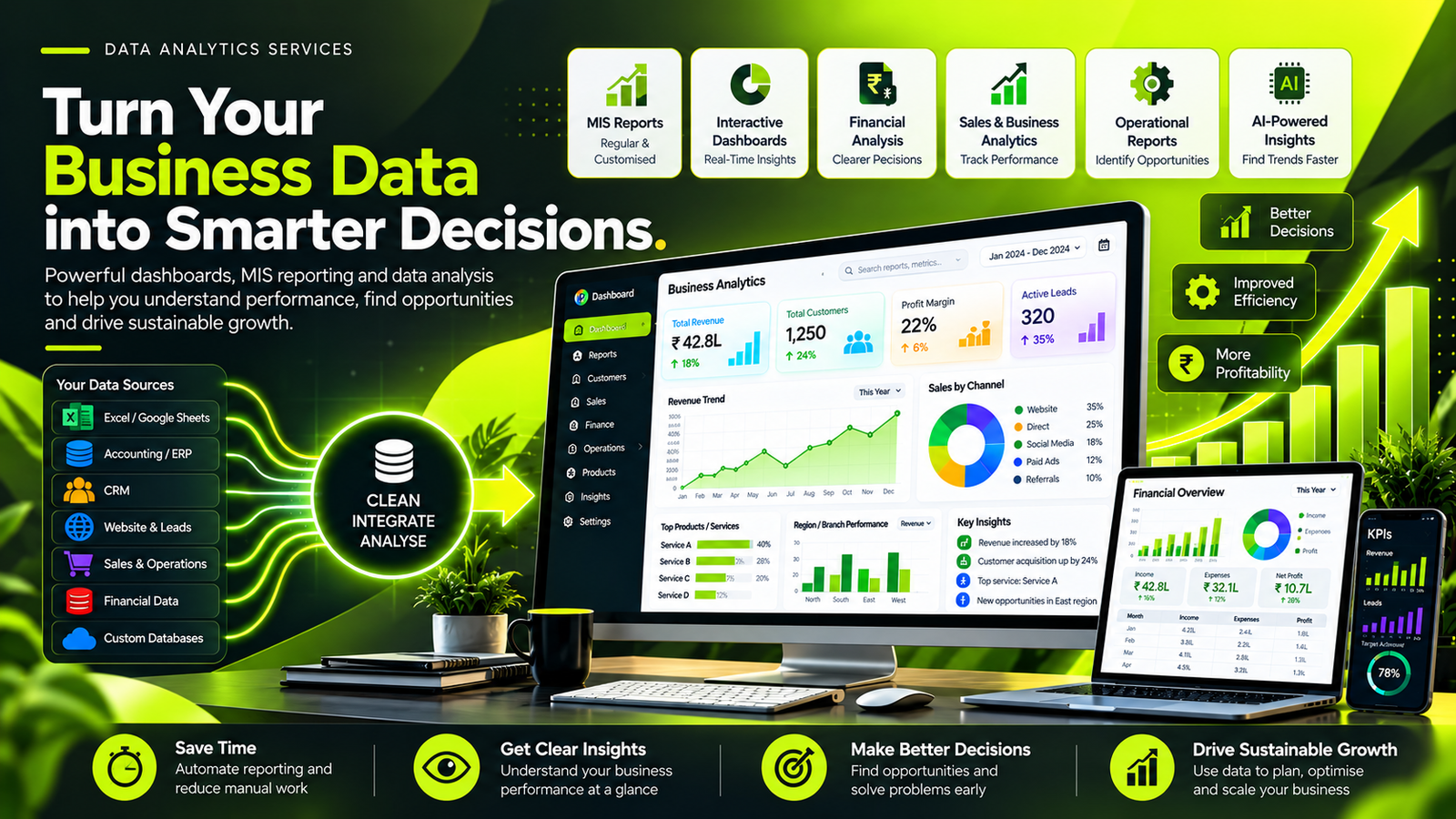
Data Analytics Dashboard Banner

DATA ANALYTICS & BUSINESS INTELLIGENCE

Data Analytics | MIS Reporting | Dashboard Development | Financial Analysis | Data Integration | Business Intelligence

Turn Your Business Data into Smarter Decisions

Your business generates data every day—from sales, customer enquiries, financial transactions and operational activities. The real opportunity lies in transforming that data into clear information that helps you understand performance and make better decisions.

At Apna Business Badhao Dot Com, we help businesses organise, analyse and visualise their data using Smart uses of AI Driven Data Analysis, Google Sheets, Microsoft Excel, Looker, Python, SQL and Power BI etc.

From automated spreadsheets and MIS reports to interactive dashboards, financial analysis and connected reporting workflows, our focus is on making business information more useful, accessible and actionable.

Understand your numbers. Identify opportunities. Improve performance. Grow with confidence.
Practical Data Analytics for Growing Businesses

Many businesses already have the information they need to improve performance, but it is often scattered across spreadsheets, accounting software, CRM platforms, databases and separate reporting systems.

Preparing reports manually can consume valuable time. Inconsistent data can create confusion, and disconnected systems can make it difficult to see the complete business picture.

Our data analytics services help businesses build a clearer and more organised approach to reporting and analysis.

We work with suitable tools such as Google Sheets, Microsoft Excel, Looker, Python, SQL and Power BI to prepare data, automate appropriate tasks, analyse trends and present important metrics through clear reports and dashboards.

The right solution depends on your business objectives, existing technology, data quality and reporting requirements. Sometimes a well-designed spreadsheet is enough. Other projects may require SQL queries, Python-based processing, a business intelligence dashboard or an integrated reporting workflow.

Our objective is not simply to create charts. It is to help you understand what is happening in your business, why it may be happening and what deserves further attention.

Our data analytics and business intelligence services

Google Sheets & Excel Reporting

Rated 4.5 out of 5

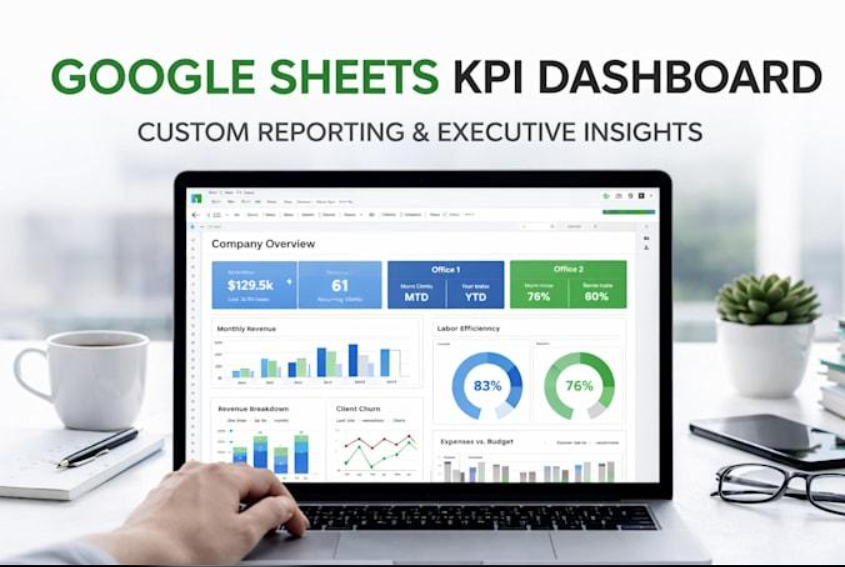
Create structured spreadsheets, MIS reports, financial trackers, sales summaries, operational reports, formulas and pivot-based analysis. Where suitable, use Google Sheets automation or Excel Power Query to reduce repetitive data preparation. Benefits: More consistent reporting, easier data review and less manual effort when the workflow is properly designed.

google sheet dashboard

Power BI Dashboard Development

Rated 4.5 out of 5

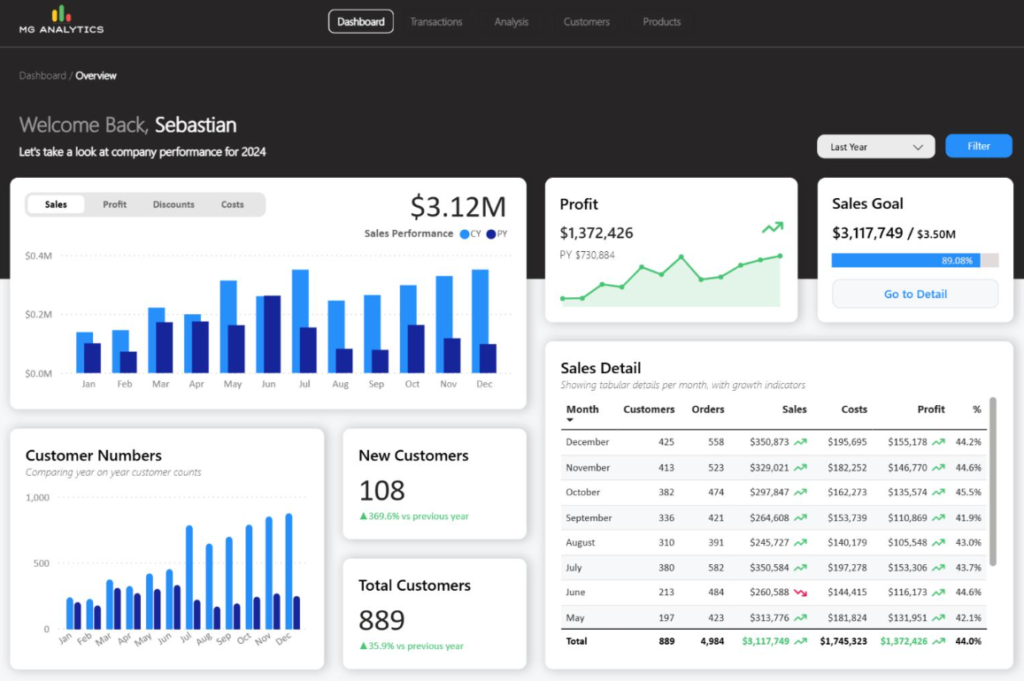
Develop interactive dashboards with KPIs, filters, trend analysis, comparisons and drill-down reporting using agreed business definitions and validated data. Benefits: A clearer view of sales, profitability, expenses, targets and operational performance, depending on the data available.

Power BI dahsboard Services

Looker & Looker Studio Reporting

Rated 4.5 out of 5

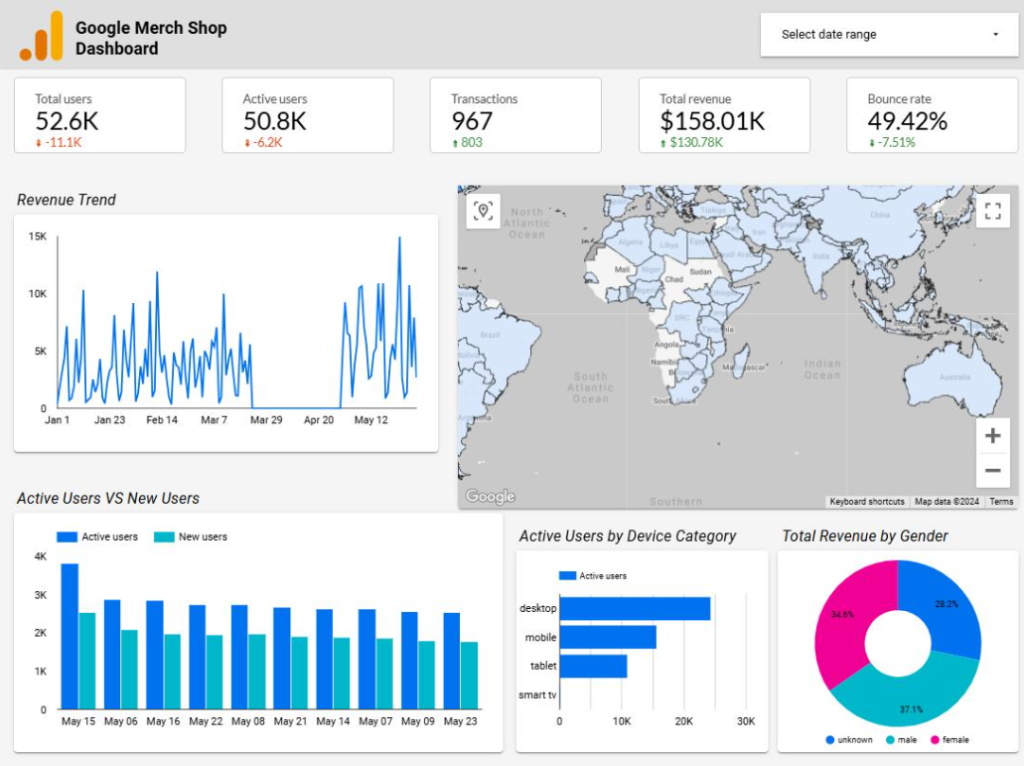
Build reporting experiences using the appropriate Google analytics and business intelligence product. Looker Studio can visualise data from supported sources, while Looker supports governed analytics models and reporting for suitable environments. Benefits: Easier exploration of trends, shared reporting views and better visibility into digital or business performance.

Google Analytics Dashboard design

Python Data Analysis & Automation

Rated 4.5 out of 5

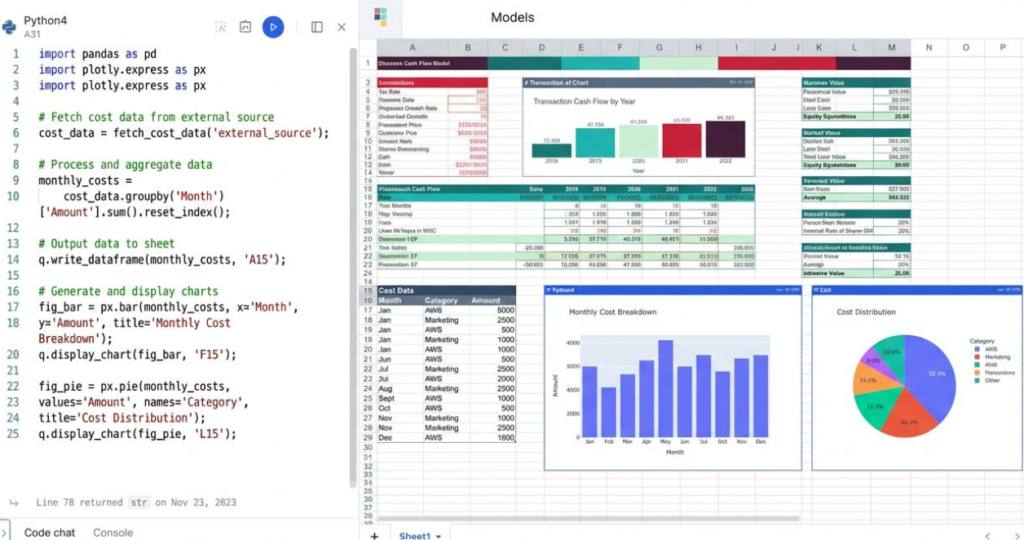
Use Python and suitable libraries such as pandas to clean, transform, combine and analyse datasets, prepare repeatable reports and explore statistical patterns. Benefits: Reusable data-processing workflows, analysis of larger or more complex datasets and reduced repetition where automation is appropriate.

data analysis dashboard python

SQL & Database Analytics

Rated 4.5 out of 5

Write and refine SQL queries to filter records, join tables, aggregate metrics and prepare datasets for dashboards and reports, subject to database access and permissions. Benefits: More repeatable data retrieval, clearer relationships between datasets and a foundation for consistent reporting.

sql data analysis dashbaord

MIS, Financial & Management Reporting

Rated 4.5 out of 5

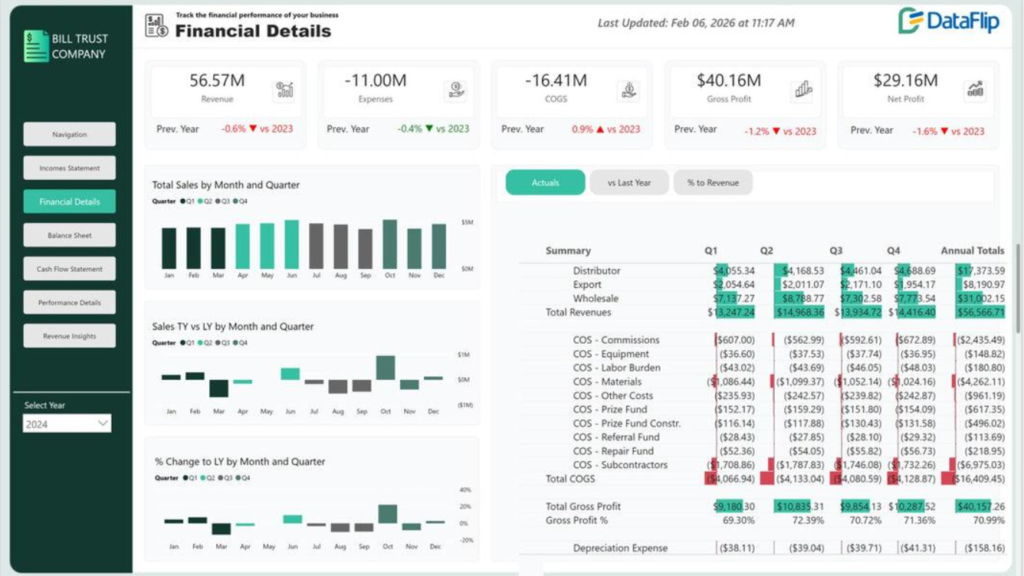
Organise management information, revenue and expense summaries, cash-flow views, budget comparisons, sales performance and other agreed financial or operational measures. Benefits: Better reporting discipline, easier performance comparisons and a more structured basis for management discussions.

Data Analysis Financial analysis

Go Beyond Reports. Understand Business Performance.

A useful report should help answer a business question—not simply display numbers.

Our reporting and analytics approach can help businesses organise information into meaningful performance measures, such as:

Sales and Revenue Analysis

Understand sales trends, product or service performance, target achievement and differences across available periods, locations or channels.

Financial Performance Analysis

Review revenue, expenses, margins, cash-flow information and budget comparisons using agreed calculations and reliable source data.

Customer and Lead Analytics

Examine enquiry volumes, lead stages, follow-up activity and conversion patterns where relevant records are available.

Marketing Performance Reporting

Bring supported marketing metrics into a clearer reporting view, helping teams compare traffic, campaign activity and enquiries without assuming that every metric directly causes sales.

Operational Performance

Review throughput, turnaround times, workload, service activity and other operational measures appropriate to the business.

Management Information System (MIS) Reports

Organise recurring daily, weekly or monthly reporting into a consistent structure with clear definitions, reporting periods and responsibilities.

Trend and Variance Analysis

Identify meaningful differences from previous periods, targets or budgets and highlight areas that may need further investigation.

Analytics can reveal patterns and support decisions, but the interpretation must consider data quality, context and other possible explanations. A dashboard is a decision-support tool, not a guarantee of business outcomes.

Bring Disconnected Business Data into a Clearer View

When information is stored in separate systems, preparing a complete report can become difficult. Sales figures may be in one spreadsheet, customer records in a CRM, expenses in accounting software and website metrics in an analytics platform.

Data integration helps bring selected information together so that it can be analysed consistently.

Depending on the tools and permissions available, we can assess workflows involving:

  • Google Sheets and Excel: Combine spreadsheet records, standardise columns and prepare consistent reporting tables.

  • Databases and SQL: Retrieve information from permitted database sources and prepare datasets for analysis.

  • Power BI: Connect supported data sources, create relationships and build dashboards with defined metrics.

  • Looker Studio: Visualise information from supported connectors and data sources.

  • Python: Automate selected data-cleaning, transformation and preparation tasks.

  • CRM and sales systems: Bring appropriate lead, customer and sales metrics into reporting workflows.

  • Accounting and ERP systems: Assess whether relevant financial or operational data can be accessed and integrated.

  • Website and marketing analytics: Combine available digital performance metrics for a more complete reporting view.

 
How an integrated reporting workflow can work

Step 1: Collect data from approved sources.

Step 2: Clean and standardise records, dates, categories and identifiers.

Step 3: Validate calculations and resolve data-quality issues.

Step 4: Combine compatible datasets using suitable tools such as SQL, Python or Power Query.

Step 5: Publish agreed metrics in Excel, Google Sheets, Power BI or Looker Studio, as appropriate.

Step 6: Review and maintain the reporting workflow as the source data or business requirements change.

Not every application can connect directly to every other application. Integration depends on supported connectors, APIs, export options, permissions, licensing and the quality of the source data.

Business benefits of data analytics

Save time on recurring reports

Reduce repetitive preparation through structured templates, reusable queries and suitable automation.

Improve visibility into performance

Bring agreed metrics into a clearer view so managers can review trends, exceptions and progress against targets.

Improve reporting consistency

Use standardised calculations, data definitions and validation checks to help reduce avoidable reporting discrepancies.

Identify opportunities and exceptions

Highlight unusual changes, performance gaps and areas that deserve further investigation.

Connect information across teams

Create a more consistent reporting view across suitable sales, finance, customer and operational datasets.

Support better business decisions

Give decision-makers clearer evidence for discussions about costs, targets, processes and growth opportunities.

Who can benefit from our data analytics services?

Example: Business benefits of data analytics

Startups and MSMEs

Build an organised reporting foundation for sales, expenses, customer enquiries and business performance without introducing unnecessary complexity.

Retail and Ecommerce

Analyse available sales, product, customer and channel data to understand trends and identify areas for further investigation.

Financial Services

Organise management reporting, portfolio summaries and operational metrics using approved data and appropriate access controls. Any credit or financial decision-making must follow the relevant policies and regulatory requirements.

Manufacturing and Trading

Review inventory, sales, purchase and operational information where reliable records are available.

Digital Marketing Agencies

Bring supported website, campaign and lead metrics into reporting views that make performance easier to review.

Professional Services

Track enquiries, projects, workload, revenue and recurring operational measures using suitable systems

Our data analytics delivery process

From Business Questions to Actionable Insights

1. Discovery and requirements

We discuss your reporting challenges, existing tools, users and the business decisions your reports should support.

2. Data source assessment

We review the available files, databases, applications, reporting periods and access permissions.

3. Data cleaning and preparation

We identify duplicates, missing values, inconsistent fields and other issues that could affect the analysis.

4. Analysis and metric definition

We agree on the calculations, KPIs, comparisons and definitions needed for the project.

5. Dashboard or report development

We build the agreed reports using suitable tools such as Excel, Google Sheets, Power BI, Looker Studio, SQL or Python.

6. Validation and review

We compare results with source data, test calculations and confirm that the reports answer the intended business questions.

7. Handover and documentation

We provide the agreed report, documentation and guidance on how to use it.

8. Ongoing improvement, if required

We can identify opportunities to improve reporting as the business changes and additional requirements emerge.

The project scope, timeline, data access, licences, integrations and maintenance arrangements should be agreed before implementation begins.

Frequently Asked Questions

About Data Analytics

What are data analytics services?

Data analytics services help businesses collect, clean, organise, analyse and visualise data to answer business questions. They may include spreadsheet analysis, SQL queries, Python processing, MIS reports, financial analysis and interactive dashboards using tools such as Power BI and Looker.

What is the difference between Excel and Power BI?

Excel is a flexible spreadsheet tool used for calculations, data preparation, analysis and reporting. Power BI focuses on interactive business intelligence reports and dashboards. They can complement one another, with Excel or other sources providing data for Power BI reporting.

Can data analytics improve business decisions?

Data analytics can support better decisions by making trends, comparisons, exceptions and performance measures easier to understand. Its usefulness depends on reliable data, appropriate analysis and how findings are interpreted in the business context.

Can you analyse financial and operational data?

Yes, where the required data is available and the agreed scope supports the work. This may include revenue, expenses, cash flow, sales, operational activity and performance comparisons. Financial figures and important interpretations should be validated against source records.

How are Python and SQL used in data analytics?

SQL is used to retrieve, filter, join and aggregate structured data. Python can help clean, transform, analyse and process datasets through reusable scripts and libraries. Both can support the preparation of reliable data for reports and dashboards.

Can you connect multiple data sources to one dashboard?

Potentially, yes. Multiple sources can sometimes be connected through supported connectors, APIs, database queries, exports or data-preparation workflows. Feasibility depends on access permissions, data compatibility, licensing and source-system limitations.

Can reporting be automated?

Some reporting tasks can be automated using tools such as Excel Power Query, Google Sheets workflows, SQL, Python or supported BI refresh features. The available options depend on source systems, permissions and technical requirements. Automated outputs should still be validated.

Is my business data kept secure?

Data handling should be agreed before work begins. Use appropriate access permissions, approved storage and secure transfer methods, and avoid sharing passwords or unnecessary sensitive information. Specific security arrangements depend on the tools and project requirements.

Can you create MIS reports using Excel and Google Sheets?

Yes. Excel and Google Sheets can support structured MIS reports, financial summaries, sales trackers, performance reports and recurring calculations. The appropriate design depends on data volume, reporting complexity, collaboration needs and automation requirements.

What is the difference between Looker and Looker Studio?

Looker is a business intelligence platform with governed data modelling and reporting capabilities. Looker Studio is a reporting and visualisation tool designed to create shareable reports from supported data sources. The right choice depends on the data environment and reporting requirements.

How much do data analytics services cost in India?

Pricing depends on the number and complexity of data sources, reporting requirements, calculations, dashboard pages, automation, integrations and ongoing support. The most useful estimate follows a review of the project scope.

Do I need a large amount of data to get started?

No. A small business can begin with relevant spreadsheets or a limited set of records. The important factors are whether the data is reliable, whether it answers the business question and whether the analysis is appropriate for the available information.

Ready to Get More Value from Your Business Data?

If your reports take too long to prepare, your data is scattered across multiple files or you need a clearer view of business performance, let's discuss your requirements.

Tell us which tools you currently use, what information you need and which decisions you want your reports to support.

We can explore a practical approach using Google Sheets, Excel, Looker, Python, SQL, Power BI or a combination of suitable tools.

Turn scattered data into clearer insights. Build better reporting.

Make more informed decisions.

Apna Business Badhao Dot Com

Related Services